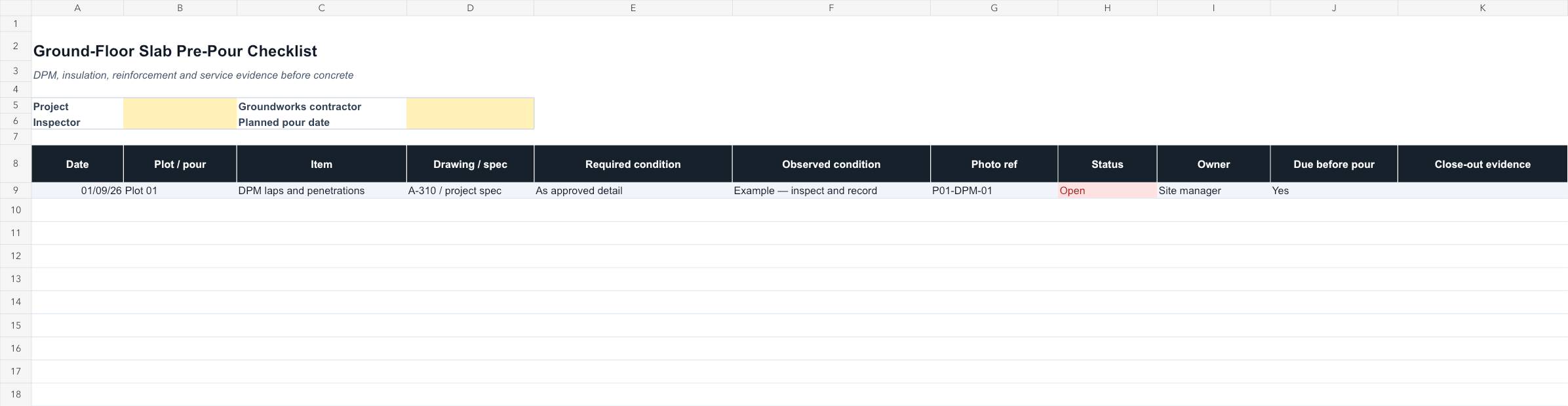
Ground-Floor Slab Pre-Pour Checklist UK dashboard preview

Dashboard preview from the delivered XLSX workbook

Back of pack

What is inside the download

Workbook tabsInstructions + Record
Live capacity40 records
FormatMacro-free XLSX
LicenceOne organisation

Product ID: CMT-JP-006 · Completed example and built-in instructions included.

Concrete QA · UK digital download

Ground-Floor Slab Pre-Pour Checklist UK

Editable, macro-free Excel workbook with sample data and formula-controlled exceptions

Complete one disciplined review before the concrete arrives. This workbook keeps the approved requirement, observed condition, photograph, status, action owner, and close-out evidence together for every item that will disappear beneath the slab.

Best for: Groundworks contractors, Site managers, Clerks of works, Housing and concrete QA teams
£19GBP
One-time payment in GBP · Editable XLSX workbook · No subscription
30-day money-back guaranteeSecure Stripe checkoutInstant download after payment

Secure Stripe Payment Link

Pay in GBP through Stripe. After payment, Stripe sends you directly to the editable XLSX workbook download.

Browse all products
Under 2 minutes to checkout Commercial project use included

This product has a fixed GBP price. Any tax due is calculated by Stripe for the customer location.

Instant XLSX downloadMacro-free workbookNo subscription

The moment you need it

Close the hidden-work actions before the concrete arrives

The slab pour is booked and the DPM, insulation, reinforcement, radon measures, and service penetrations are about to become inaccessible. Open actions must be visible and closed before concrete placement.

Project boundary: Build the checklist from the approved structural drawings, architectural details, inspection plan, radon strategy where applicable, and product instructions. Required approvals vary by project.

Ground-Floor Slab Pre-Pour Checklist UK
£19

Product specifications

Product ID / format
CMT-JP-006 · Editable macro-free XLSX
Compatibility
Microsoft Excel, Excel Online, Google Sheets import
Verified contents
Instructions, completed example and 40 live record rows
Delivery and licence
Direct post-payment workbook download; single-organization project use included

Exact workbook structure

See where every piece of information goes

The delivered file contains two focused tabs: instructions for setup and a working record with one completed example plus 40 blank live rows.

Workbook tabs

  • Instructions
  • Record

Record fields

DPM and penetrations
Insulation continuity
Radon barrier where applicable
Reinforcement and cover
Levels and dimensions
Service locations
Drawing references
Photo evidence
Open actions
Close-out approval

Built-in workflow features

  • Requirement, observation, status, owner, and deadline on one row
  • Photo evidence and close-out proof kept together
  • Project-specific checks can be added without changing the core workflow

Why this is more than a blank checklist

  • Focused on work that becomes inaccessible after the pour
  • Makes unresolved actions and ownership visible
  • Connects each observation to approved drawings and specifications

What's Included

  • Editable UK pre-pour workbook
  • Requirement-versus-observation fields
  • Drawing and specification references
  • Photo evidence register
  • Open-action owner and deadline fields
  • Close-out evidence column

Compatible With

  • Microsoft Excel
  • Excel Online
  • Google Sheets import

How to Use

Review the included instructions and project criteria before replacing the clearly labelled sample data.

  1. 1Download the XLSX workbook after Stripe confirms payment.
  2. 2Save the original, then create a separate copy for the project or property.
  3. 3Read the Instructions sheet and complete the project-identification fields.
  4. 4Replace the grey example with the first live record.
  5. 5Complete each record as the work proceeds, then save the issued project copy.

Use Cases

Groundworks contractors
Site managers
Clerks of works
Housing and concrete QA teams

Who it is—and is not—for

Built for: Groundworks contractors, Site managers, Clerks of works, Housing and concrete QA teams.

Not for: Structural design, pour authorisation by an unauthorised person, or replacing project inspections and approvals.

Evidence and boundaries

Technical references

These sources explain the record-keeping context behind this product. They do not make the workbook an approved form, and they do not replace the current project specification, manufacturer documents, risk controls, or competent judgement.

References reviewed for this page on 13 September 2026.

FAQs

Licence: The editable workbook is licensed for internal project use by one purchasing organization. Redistribution, resale and source sharing with another organization are prohibited.

Refunds: 30-day money-back guarantee on all purchases. If the workbook is materially not as described or you are not satisfied, contact us within 30 days. Refund Policy

This workbook organizes project records. It does not provide engineering, legal, safety or code-compliance advice and does not replace qualified review or sign-off.
Related Products

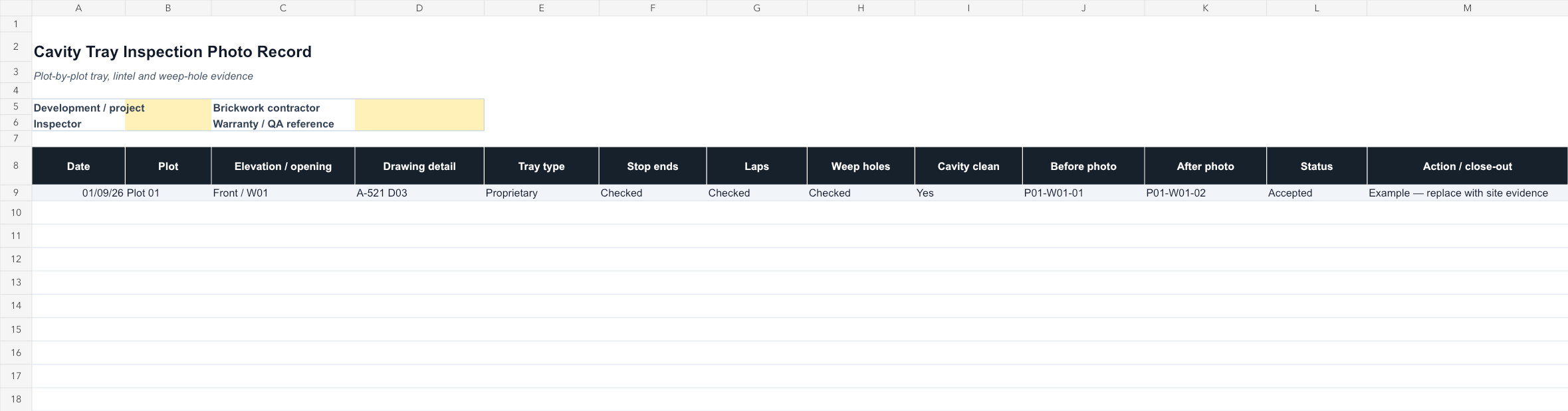
Cavity Tray Inspection Photo Record Template dashboard preview
Masonry QAExcel workbook

Cavity Tray Inspection Photo Record Template

Plot-by-plot Excel register for cavity trays, stop ends, laps, weep holes, cavity cleanliness, photographs, status, and close-out actions.
Best for: Brickwork contractors, Housing site managers, Clerks of works, Developer and warranty QA teams
Editable Excel system · 40 record rows
Instant XLSX download · No subscription
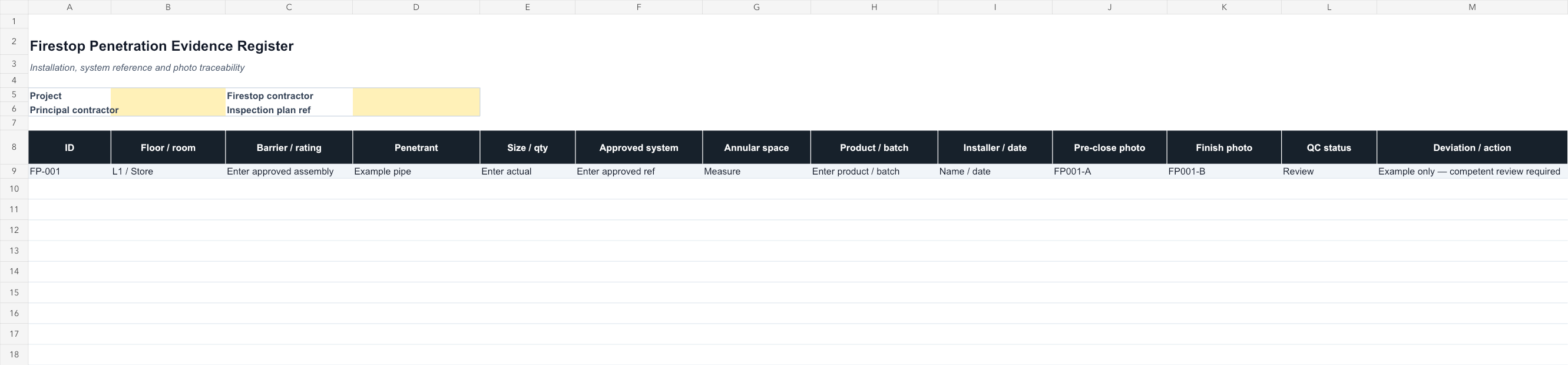
Firestop Penetration Evidence Register Template dashboard preview
Firestopping QAExcel workbook

Firestop Penetration Evidence Register Template

Editable Excel schedule linking each penetration to its rated barrier, approved system, annular space, product batch, installer, photographs, and QC status.
Best for: Firestopping installers, Principal-contractor QA teams, MEP coordinators, Handover-documentation teams
Editable Excel system · 40 record rows
Instant XLSX download · No subscription
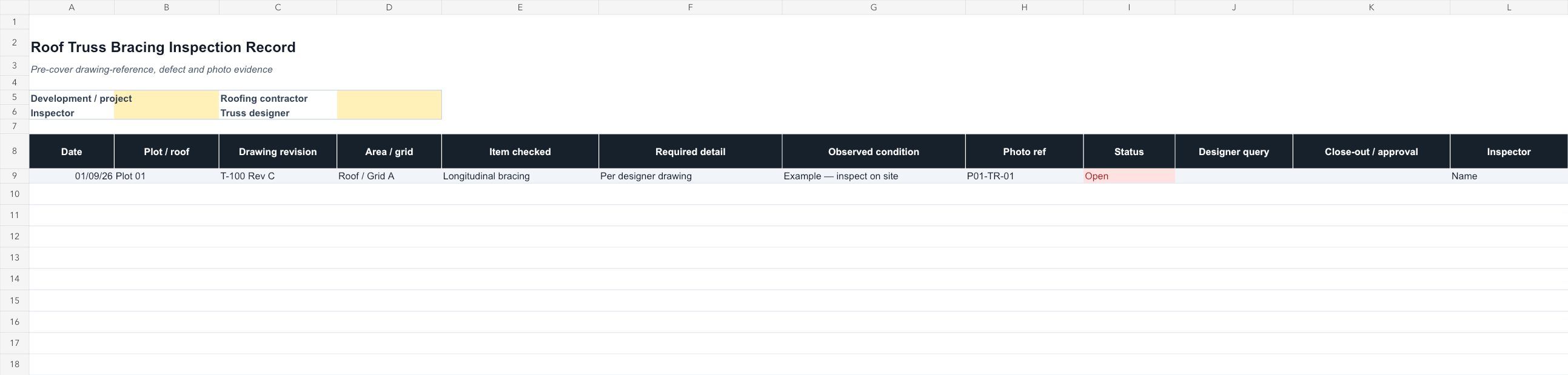
Roof Truss Bracing Inspection Record Template dashboard preview
Roofing QAExcel workbook

Roof Truss Bracing Inspection Record Template

Editable pre-cover register for truss drawing revisions, areas, required details, observed conditions, photos, open actions, designer queries, and approval.

Best for: Roofing contractors, Timber-frame contractors, Site managers, Housing QA and handover teams
Editable Excel system · 40 record rows
Instant XLSX download · No subscription

Run the pre-pour review while every detail can still be corrected

Give the team one controlled record for DPM, insulation, reinforcement, services, photos, actions, and close-out.

Browse all products