Tool Set AutoLink
Install a complete purchased BTX package without opening Revu's import dialog for every file. AutoLink validates the package, finds installed Revu versions and sends all selected Tool Sets in one documented command-line import.
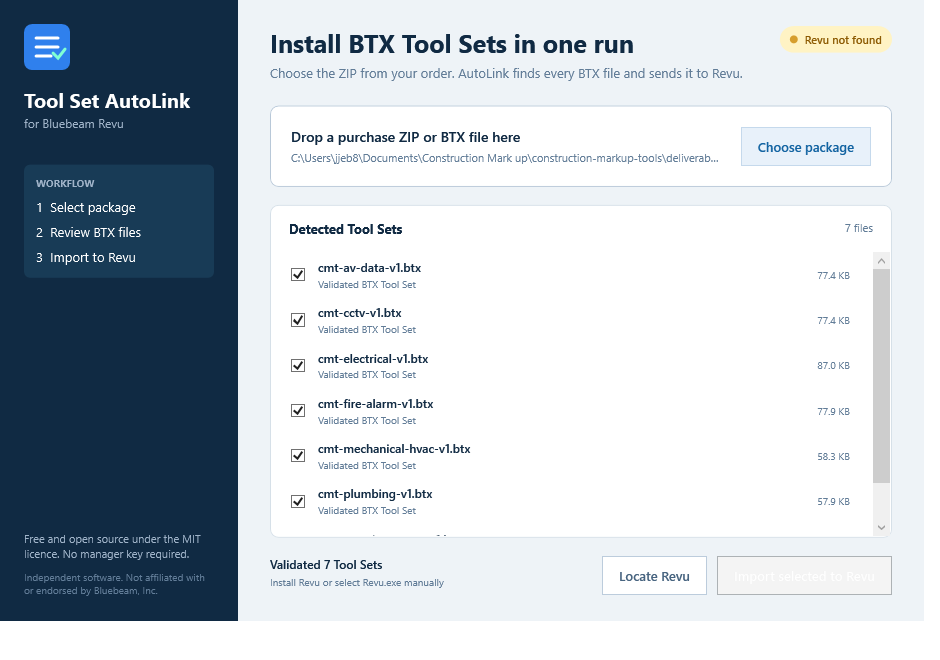
One package to Tool Chest workflow
AutoLink uses Bluebeam's documented BTX command-line import instead of modifying Revu files or attempting to reproduce the Tool Chest itself.
Choose the ZIP
Drop in a purchased Construction Markup Tools package or select a standalone BTX file.
Validate every BTX
AutoLink extracts only BTX entries, rejects invalid files and lists each Tool Set before import.
Send them to Revu
Select the Tool Sets and launch the documented Revu import command once for the complete package.
Built for a local workflow
- MIT-licensed utility with no manager licence key
- No administrator privileges required
- No analytics, account login or customer-file upload
- ZIP path protection, BTX size limits and XML-root validation
- Revu auto-detection with a manual Revu.exe fallback
- Purchase licences still govern the supplied Tool Set files
Project downloads
The linked GitHub repository is the source of truth for the current source code and any releases. This store does not sell or deliver an AutoLink installer.
Need BTX Tool Sets to import?
Get a free BTX sample or choose a complete trade package.
Bluebeam is a trademark of its respective owner. Construction Markup Tools is an independent resource and is not affiliated with, sponsored by, or endorsed by Bluebeam, Inc. All products are original resources created to support construction markup workflows.